<!DOCTYPE html>
	<html lang="vi" xmlns="http://www.w3.org/1999/xhtml" prefix="og: http://ogp.me/ns#">
	<head>
<title>Hướng dẫn thiết lập cấu hình đề thi trong hệ thống tạo đề trắc nghiệm AZTest</title>
<meta name="description" content="Hướng dẫn thiết lập cấu hình đề thi trong hệ thống tạo đề trắc nghiệm AZTest - Savefile - Tin tức -...">
<meta name="author" content="APTIS by Edulearn">
<meta name="copyright" content="APTIS by Edulearn [thuylinhedulearn@gmail.com]">
<meta name="generator" content="NukeViet v4.5">
<meta name="viewport" content="width=device-width, initial-scale=1">
<meta http-equiv="Content-Type" content="text/html; charset=utf-8">
<meta property="og:title" content="Hướng dẫn thiết lập cấu hình đề thi trong hệ thống tạo đề trắc nghiệm AZTest">
<meta property="og:type" content="website">
<meta property="og:description" content="Savefile - Tin tức - https&#x3A;&#x002F;&#x002F;anhnguedulearn.aztest.vn&#x002F;news&#x002F;savefile&#x002F;huong-dan&#x002F;huong-dan-thiet-lap-cau-hinh-de-thi-trong-he-thong-tao-de-trac-nghiem-aztest-23.html">
<meta property="og:site_name" content="APTIS by Edulearn">
<meta property="og:url" content="https://anhnguedulearn.aztest.vn/news/savefile/huong-dan/huong-dan-thiet-lap-cau-hinh-de-thi-trong-he-thong-tao-de-trac-nghiem-aztest-23.html">
<meta property="og:image" content="https://anhnguedulearn.aztest.vn/uploads/anhnguedulearn/banner-edulearn.png">
<link rel="shortcut icon" href="https://anhnguedulearn.aztest.vn/uploads/anhnguedulearn/logo-anh-ngu-edulearn-04.png">
<link rel="canonical" href="https://anhnguedulearn.aztest.vn/news/savefile/huong-dan/huong-dan-thiet-lap-cau-hinh-de-thi-trong-he-thong-tao-de-trac-nghiem-aztest-23.html">
<link rel="alternate" href="https://anhnguedulearn.aztest.vn/news/rss/" title="Tin tức" type="application/rss+xml">
<link rel="alternate" href="https://anhnguedulearn.aztest.vn/news/rss/Tin-tuc/" title="Tin tức - Tin tức" type="application/rss+xml">
<link rel="alternate" href="https://anhnguedulearn.aztest.vn/news/rss/thong-cao-bao-chi/" title="Tin tức - Thông cáo báo chí" type="application/rss+xml">
<link rel="alternate" href="https://anhnguedulearn.aztest.vn/news/rss/Ban-tin-noi-bo/" title="Tin tức - Bản tin nội bộ" type="application/rss+xml">
<link rel="alternate" href="https://anhnguedulearn.aztest.vn/news/rss/Tin-cong-nghe/" title="Tin tức - Tin công nghệ" type="application/rss+xml">
<link rel="alternate" href="https://anhnguedulearn.aztest.vn/news/rss/huong-dan/" title="Tin tức - Hướng dẫn" type="application/rss+xml">
<link rel="alternate" href="https://anhnguedulearn.aztest.vn/news/rss/tu-van/" title="Tin tức - Tư vấn" type="application/rss+xml">
<link rel="alternate" href="https://anhnguedulearn.aztest.vn/news/rss/khach-hang/" title="Tin tức - Khách hàng" type="application/rss+xml">
<link rel="preload" as="style" href="https://fonts.googleapis.com/css?family=Noto+Serif+TC|Poppins" type="text/css">
<link rel="preload" as="style" href="https://anhnguedulearn.aztest.vn/assets/css/font-awesome.min.css" type="text/css">
<link rel="preload" as="style" href="https://anhnguedulearn.aztest.vn/themes/news21/css/bootstrap.min.css" type="text/css">
<link rel="preload" as="style" href="https://anhnguedulearn.aztest.vn/themes/news21/css/style.css" type="text/css">
<link rel="preload" as="style" href="https://anhnguedulearn.aztest.vn/themes/news21/css/style.responsive.css" type="text/css">
<link rel="preload" as="style" href="https://anhnguedulearn.aztest.vn/themes/news21/css/menu_mobile_news10.css" type="text/css">
<link rel="preload" as="style" href="https://anhnguedulearn.aztest.vn/themes/news21/css/news.css" type="text/css">
<link rel="preload" as="script" href="https://anhnguedulearn.aztest.vn/assets/js/jquery/jquery.min.js" type="text/javascript">
<link rel="preload" as="script" href="https://anhnguedulearn.aztest.vn/assets/js/language/vi.js" type="text/javascript">
<link rel="preload" as="script" href="https://anhnguedulearn.aztest.vn/assets/js/DOMPurify/purify3.js" type="text/javascript">
<link rel="preload" as="script" href="https://anhnguedulearn.aztest.vn/assets/js/global.js" type="text/javascript">
<link rel="preload" as="script" href="https://anhnguedulearn.aztest.vn/assets/js/site.js" type="text/javascript">
<link rel="preload" as="script" href="https://anhnguedulearn.aztest.vn/themes/news21/js/news.js" type="text/javascript">
<link rel="preload" as="script" href="https://anhnguedulearn.aztest.vn/themes/news21/js/main.js" type="text/javascript">
<link rel="preload" as="script" href="https://www.googletagmanager.com/gtag/js?id=UA-163906928-1" type="text/javascript">
<link rel="preload" as="script" href="https://anhnguedulearn.aztest.vn/themes/news21/js/bootstrap.min.js" type="text/javascript">
<link rel="preload" as="script" href="https://anhnguedulearn.aztest.vn/themes/news21/js/script.js" type="text/javascript">
<link href="https://fonts.googleapis.com/css?family=Noto+Serif+TC|Poppins" rel="stylesheet">
<link rel="StyleSheet" href="https://anhnguedulearn.aztest.vn/assets/css/font-awesome.min.css">
<link rel="StyleSheet" href="https://anhnguedulearn.aztest.vn/themes/news21/css/bootstrap.min.css">
<link rel="StyleSheet" href="https://anhnguedulearn.aztest.vn/themes/news21/css/style.css">
<link rel="StyleSheet" href="https://anhnguedulearn.aztest.vn/themes/news21/css/style.responsive.css">
<link rel="StyleSheet" href="https://anhnguedulearn.aztest.vn/themes/news21/css/menu_mobile_news10.css">
<link rel="StyleSheet" href="https://anhnguedulearn.aztest.vn/themes/news21/css/news.css">
<style>
	body{background: #fff;}
</style>
	<!-- Global site tag (gtag.js) - Google Analytics -->
</head>
	<body>
<div id="print">
	<div id="hd_print">
		<h2 class="pull-left">APTIS by Edulearn</h2>
		<p class="pull-right"><a title="APTIS by Edulearn" href="https://anhnguedulearn.aztest.vn/">https://anhnguedulearn.aztest.vn</a></p>
	</div>
	<div class="clear"></div>
	<hr />
	<div id="content">
		<h1>Hướng dẫn thiết lập cấu hình đề thi trong hệ thống tạo đề trắc nghiệm AZTest</h1>
		<ul class="list-inline">
			<li>Thứ năm - 14/05/2020 17:09</li>
			<li class="hidden-print txtrequired"><em class="fa fa-print">&nbsp;</em><a title="In ra" href="javascript:;" onclick="window.print()">In ra</a></li>
			<li class="hidden-print txtrequired"><em class="fa fa-power-off">&nbsp;</em><a title="Đóng cửa sổ này" href="javascript:;" onclick="window.close()">Đóng cửa sổ này</a></li>
		</ul>
		<div class="clear"></div>
		<div id="hometext">
			Bạn đang gặp khó khăn trong quá trình thiết lập cấu hình đề thi trắc nghiệm trong hệ thống AZtest? Bài viết sau đây của chúng tôi sẽ giúp bạn dễ dàng cầu hình đề thi của mình chỉ trong vòng “một nốt nhạc”.
		</div>
				<div class="imghome">
			<img alt="Hướng dẫn thiết lập cấu hình đề thi trong hệ thống tạo đề trắc nghiệm AZTest" src="https://lh4.googleusercontent.com/mxY8a9oSQXDQQk3tQQ0CbOdXCKj_U-8Ewe_b1o3cvv3lCmM3522IQgvFw_0FWk1LKsCILcLZXIQo40k5NOwhPI_1D1It7XBS_17kzuJ1VGmJVWI2Vcn_vWHXoKBCsbkmvIKncVki" width="460" class="img-thumbnail" />
		</div>
		<div class="clear"></div>
		<div id="bodytext" class="clearfix">
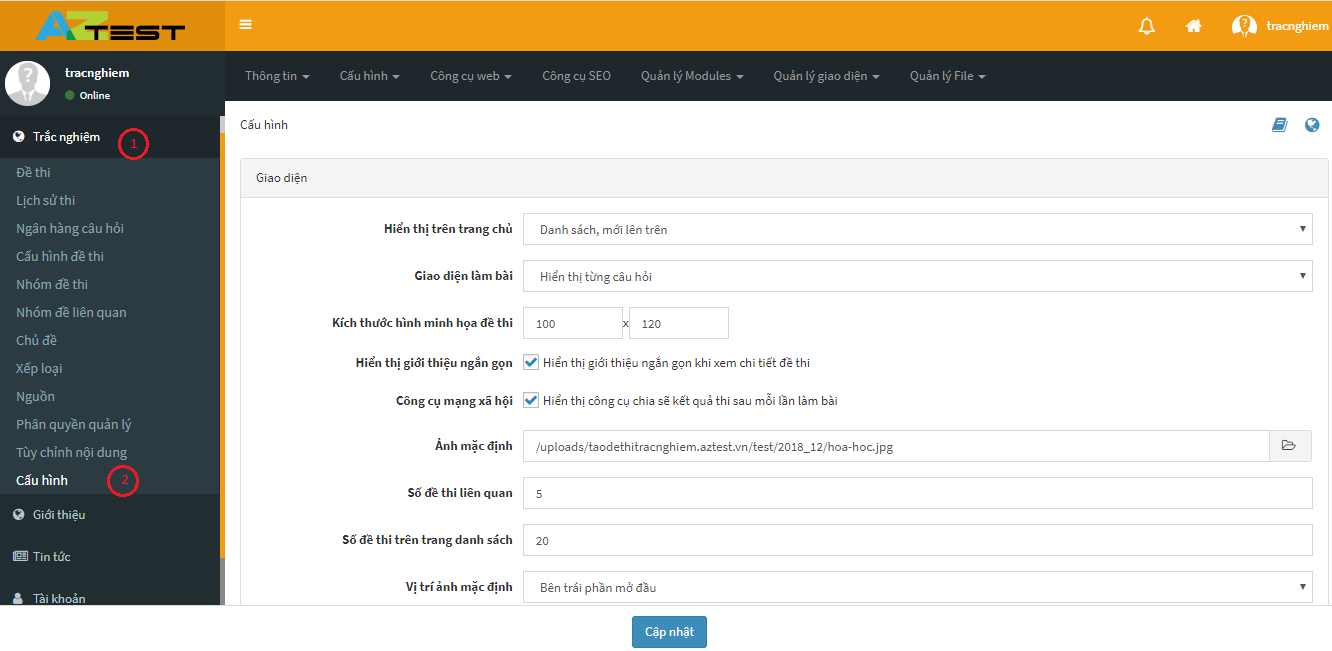
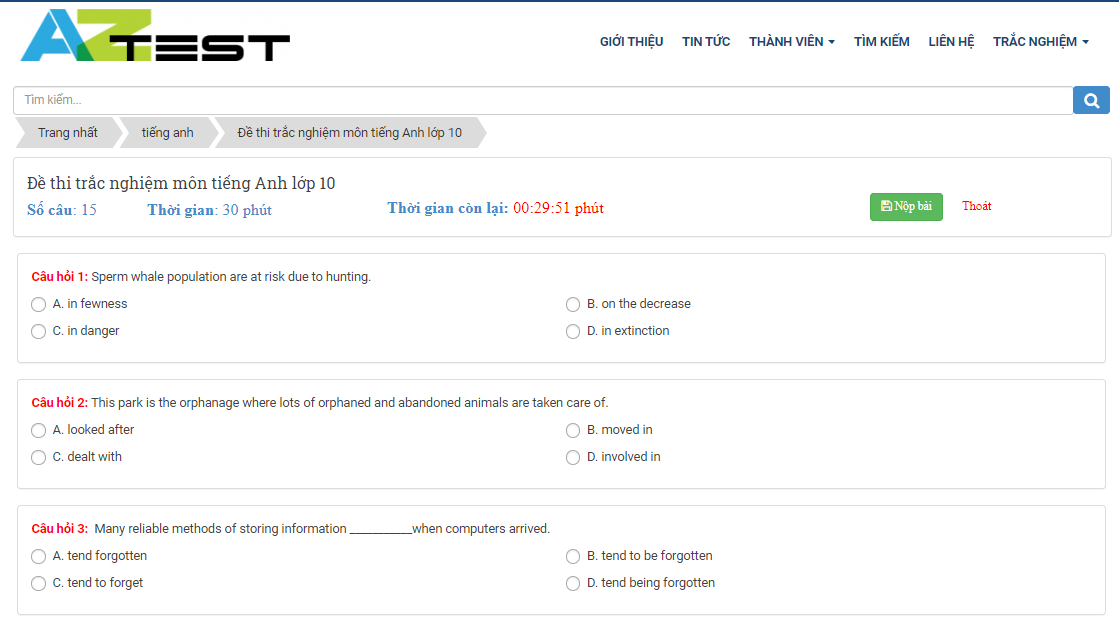
			<p><span style="font-size:14px;"><span style="font-family:Arial,Helvetica,sans-serif;">Để thiết lập cấu hình đề thi trắc nghiệm trên hệ thống tạo đề thi trắc nghiệm AZtest bạn thực hiện các bước sau:</span></span></p><p><span style="font-size:14px;"><span style="font-family:Arial,Helvetica,sans-serif;"><u><strong>Bước 1</strong></u>:&nbsp;Truy cập vào trang quản trị</span></span></p><p><span style="font-size:14px;"><span style="font-family:Arial,Helvetica,sans-serif;"><u><strong>Bước 2</strong></u>: Chọn&nbsp;<strong>Trắc nghiệm(1) -&gt; Cấu hình(2)</strong></span></span></p><div style="text-align:center"><img alt="" height="293" src="https://lh4.googleusercontent.com/mxY8a9oSQXDQQk3tQQ0CbOdXCKj_U-8Ewe_b1o3cvv3lCmM3522IQgvFw_0FWk1LKsCILcLZXIQo40k5NOwhPI_1D1It7XBS_17kzuJ1VGmJVWI2Vcn_vWHXoKBCsbkmvIKncVki" title="" width="600" /></div><h2 id="h.ymo65posub3d"><span style="font-size:22px;"><strong>1. Nhóm được truy cập</strong></span></h2><p><span style="font-size:14px;"><span style="font-family:Arial,Helvetica,sans-serif;">Thiết lập nhóm thành viên có thể truy cập vào khu vực làm bài thi trên trang chủ. Tại đây, bạn có thể chọn một hoặc nhiều nhóm thành viên.</span></span></p><div style="text-align:center"><img alt="" src="https://lh6.googleusercontent.com/1fxOEwFzfGzkAB15yxNI3tXdcZeYClhF_mIOljsyM9s2_4YW7Ny9MLqqYSdKvn7Qmd5q6ehnb42LbV24H8uM8ngDewPRVWOdRGOk4PZbF91mGuFIDz4jOg_NU95dqpYY57yRfPmW" title="" /></div><p><span style="font-size:14px;"><span style="font-family:Arial,Helvetica,sans-serif;">Bạn có thể quản lý nhóm thành viên thông qua&nbsp;<strong>Quản lý nhóm thành viên</strong>.</span></span></p><p><span style="font-size:14px;"><span style="font-family:Arial,Helvetica,sans-serif;">Nếu một thành viên&nbsp;<strong>KHÔNG</strong>&nbsp;nằm trong các nhóm cho phép, họ sẽ thấy được thông báo về quyền truy cập.</span></span></p><div style="text-align:center"><img alt="" height="101" src="https://lh6.googleusercontent.com/gbdazG3x0zgCBQMRNuqBnus6znnMhbiZ1ataoGgcPV3sLO_d2uGvygXYF_lIYszbyq1g0moueYVKf9g3wTl28I4kYgzZe8kjOu0aueScoEGcb8je5ifu_1iSo3zD_1_RJkDxcSdA" title="" width="772" /></div><h2 id="h.cwgfxwa6l8ky"><span style="font-size:22px;"><strong>2. Hiển thị trên trang chủ</strong></span></h2><p><span style="font-size:14px;"><span style="font-family:Arial,Helvetica,sans-serif;">Click vào mũi tên bên phải dòng&nbsp;<strong>Hiển thị trên trang chủ&nbsp;</strong>để lựa chọn cách hiển thị của đề thi trên trang chủ.</span></span></p><div style="text-align:center"><img alt="" height="287" src="https://lh3.googleusercontent.com/o_myOH-75tSDC1KVhbVjpnIXkjy6vMktrEA7C2P6cQecYRXmnxaYYAIMe8CH3l68CiEb2AJCA1sxwLhYHy2XlZiJw_TwqgcEJeVqTkZzToWulPjtnEEvTdqYlaK1XbU45woawjCF" title="" width="600" /></div><ul>	<li><span style="font-size:14px;"><span style="font-family:Arial,Helvetica,sans-serif;">Nếu chọn kiểu&nbsp;<strong>Hiển thị trên trang chủ -&gt;&nbsp;Danh sách, mới lên trên</strong>.</span></span></li></ul><p><span style="font-size:14px;"><span style="font-family:Arial,Helvetica,sans-serif;">Các đề thi sẽ được sắp xếp thành một danh sách, những đề thi nào mới sẽ được tự động đẩy lên trên.</span></span></p><div style="text-align:center"><img alt="" height="302" src="https://lh5.googleusercontent.com/h1-R7qUPShXr9qQThf8soQy9KUUKvHRzatUITdpTS775-V00ffFVK0jPAdr_Qaj-Zeetbcxx9BNAX9SxZaoh3jaZj56DRle2bbe3Fd9T_5o-1WiFxSP-ghr54t9X3BNoTxJQP_Uc" title="" width="600" /></div><ul>	<li><span style="font-size:14px;"><span style="font-family:Arial,Helvetica,sans-serif;">Nếu chọn kiểu&nbsp;<strong>Hiển thị trên trang chủ -&gt;&nbsp;Chuyên mục, đề thi nhỏ nằm dưới</strong>.</span></span></li></ul><p><span style="font-size:14px;"><span style="font-family:Arial,Helvetica,sans-serif;">Các đề thi sẽ được sắp xếp thành các chuyên mục, các đề thi nhỏ sẽ nằm bên dưới chuyên mục.</span></span></p><div style="text-align:center"><img alt="" height="287" src="https://lh5.googleusercontent.com/v57gKdtf8yrhdYY0x6zzYrw2xXQMg4-3iO6mHh0oPVE1okt7kkfPoCcTyE2XVd6v7aBNGKci7_laq-QshhCGhakOVh9wTb_Hgl3-MiNxT6xkEtKjN6SH0r4CkJSpG-c3CC_x-H_x" title="" width="600" /></div><ul>	<li><span style="font-size:14px;"><span style="font-family:Arial,Helvetica,sans-serif;">Nếu chọn kiểu&nbsp;<strong>Hiển thị trên trang chủ -&gt;&nbsp;Chuyên mục, đề thi nhỏ nằm bên phải.</strong></span></span></li></ul><p><span style="font-size:14px;"><span style="font-family:Arial,Helvetica,sans-serif;">Các đề thi sẽ được sắp xếp thành chuyên mục, các đề thi nhỏ thuộc chủ đề sẽ nằm bên phải.</span></span></p><div style="text-align:center"><img alt="" height="286" src="https://lh3.googleusercontent.com/RfJWRSwd9IQGFQEKNDhe4XSo8yuE1NQ_vXdl9Ep-itpIIVUl1mwecILzX0YtDrKjILVLMkvJmqpHfrh3pFWLRFTeeG7zAXKC5RmFV7ANryhWHXzacQzCqmxiRBmnFPk0qVNnyy6b" title="" width="600" /></div><ul>	<li><span style="font-size:14px;"><span style="font-family:Arial,Helvetica,sans-serif;">Nếu chọn kiểu&nbsp;<strong>Hiển thị trên trang chủ -&gt;&nbsp;Chuyên mục thành 2 cột.</strong></span></span></li></ul><p><span style="font-size:14px;"><span style="font-family:Arial,Helvetica,sans-serif;">Các đề thi sẽ được chia đều thành 2 cột.</span></span></p><div style="text-align:center"><img alt="" height="307" src="https://lh6.googleusercontent.com/g1Vp-jX21z4QmvJTbWO4v8wNpxr3UI1779C4FThZw4z_S04HJqd4kEOIn-mQ4K1TW9OzYk829BTCElHhTBGqs5a2VeWGoFeqQemqnRdjGEaUqipkdO3WLvCRINlel803o9WDnYCY" title="" width="600" /></div><ul>	<li><span style="font-size:14px;"><span style="font-family:Arial,Helvetica,sans-serif;">Nếu chọn kiểu&nbsp;<strong>Hiển thị trên trang chủ -&gt;&nbsp;Chuyên mục chính cấp 1, phụ cấp 2.</strong></span></span></li></ul><p><span style="font-size:14px;"><span style="font-family:Arial,Helvetica,sans-serif;">Các đề thi sẽ được chia làm 2 loại chuyên mục: chuyên mục chính và chuyên mục phụ</span></span></p><div style="text-align:center"><img alt="" height="202" src="https://lh3.googleusercontent.com/WDLfpQgmDwUvrfLqMpYNUZaulumtE7I4sJb6NcZMiXRW6Ia5b6V5q_bSI2tjisdgPPgDC_uHacRNpnhPvhluPYmAVgnLyWO2JB53QSvM3TNbN5UO5T7nG2V5k065IkGKZtwDT38I" title="" width="600" /></div><h2 id="h.vgw7o3yncb35"><span style="font-size:22px;"><strong>3. Cấu hình hiển thị giao diện làm bài</strong></span></h2><p><span style="font-size:14px;"><span style="font-family:Arial,Helvetica,sans-serif;">Click vào mũi tên bên phải để chọn Cấu hình hiển thị giao diện làm bài.</span></span></p><div style="text-align:center"><img alt="" height="271" src="https://lh3.googleusercontent.com/VTFJCeoCm-gB6oxzF2lmRTT0OZSzUyurV4Q1cPuRh__Ko0GV8R_KjPAyXFZzWk6rAIjbFrzsBvPn76UsGtYszedMtlI_YNgbQsvfAGAlAdyVNrazuhjHCz8vKn10LwvDsP0uB0WB" title="" width="600" /></div><ul>	<li><span style="font-size:14px;"><span style="font-family:Arial,Helvetica,sans-serif;">Nếu chọn&nbsp;<strong>Hiển thị theo dạng danh sách</strong>&nbsp;thì các câu hỏi trong đề thi sẽ hiển thị theo dạng danh sách theo số thứ tự.</span></span></li></ul><div style="text-align:center"><img alt="" height="335" src="https://lh6.googleusercontent.com/_0c4ylsl2vwg0DTH1XDHyCo-iejqRghCnIXi7XmiC6G9LFWZ02XaLySBmhM4k70n9J_OK0wOXmnRxxBhEBIEWecrk2Kulg1PtTP9EKkgc9kZ9LBgsNr7HsATM3tJe5OW4aBYY8EO" title="" width="600" /></div><ul>	<li><span style="font-size:14px;"><span style="font-family:Arial,Helvetica,sans-serif;">Nếu chọn&nbsp;<strong>Hiển thị từng câu hỏi</strong>&nbsp;thì trên giao diện làm bài sẽ hiển thị từng câu hỏi một, sau khi làm xong một cậu, click Kế tiếp để tiếp tục làm bài.</span></span></li></ul><div style="text-align:center"><img alt="" height="310" src="https://lh5.googleusercontent.com/iqp_xTGs4Qiot2EP8dlA6iT4dEtHNMs7AZ-YT1yyD_TdlPW0632IuDiuxxNgtMGFyJJvbhk_N7MhVj8xfuAmfD4AmpbnE589liMCrwGrHhQ9crsz9HZir3Q9_QDZ8iyQDIhYdBsj" title="" width="600" /></div><p>&nbsp;</p><h2 id="h.nhrf5gri1vv9"><span style="font-size:22px;"><strong>4. Cấu hình thành viên xóa lịch sử thi</strong></span></h2><span style="font-size:14px;"><span style="font-family:Arial,Helvetica,sans-serif;"><img alt="" src="https://lh3.googleusercontent.com/1YMWwztskuclalXXvyxG-er4ee-AQDVGVFvSsHMrxAx_vBte5LvxFTz19KXKfyDAa6FVhdtk9bq5eqBcsS7Bl9AzoPZBfJGeKEUTWh0TYyL0wiA9NcGuHNjk97nF8uBHKDIZqzC1" title="" /></span></span><p><span style="font-size:14px;"><span style="font-family:Arial,Helvetica,sans-serif;">Mục này cho phép người quản trị cấu hình quyền hạn xóa lịch sử thi của thành viên, nếu người dùng tích chọn&nbsp;<em><strong>Cho phép thành viên xóa lịch sử thi&nbsp;</strong></em>thì thành viên khi truy cập vào trang lịch sử thi của mình có thể xóa bất kỳ lịch sử thi nào mà người dùng mong muốn.</span></span></p><div style="text-align:center"><img alt="" height="230" src="https://lh3.googleusercontent.com/k6HgKGvgMlHvpEttfAde4Ra2R6J-p0u1tPIz0zLdKgld6xZKEZKgSznoO7QxJHhzUaGmQhSepZlO7t2g5VfnDGW5JKpyN7fN-tcbJ8gw9DJW259Brr1x0rv-RBcjk_ndNnYnEp1l" title="" width="600" /></div><h2 id="h.4mnyi3u3upoc"><span style="font-size:22px;"><strong>5. Các thiết lập khác</strong></span></h2><div style="text-align:center"><img alt="" height="230" src="https://lh3.googleusercontent.com/gm-boLzy9bzDleIywZV4HnFRCUwbr-BBp6uVjaR1xGqV6y452SWuRwVtJQRAogqfNQvj81jS6euNypVOwmDbwQRA5xEMcRVU3U4mGYGwuSHX9ykrPfD5KDqNHSqCD-rNrS--3iP0" title="" width="600" /></div><p><span style="font-size:14px;"><span style="font-family:Arial,Helvetica,sans-serif;">Sau khi đã chọn đầy đủ các mục click&nbsp;<strong>Cập nhật&nbsp;</strong>để hoàn thành.</span></span></p><p><span style="font-size:14px;"><span style="font-family:Arial,Helvetica,sans-serif;">Trên đây là các cấu hình đề thi trong hệ thống tạo đề thi trắc nghiệm&nbsp;<strong><a href="https://www.google.com/url?q=https://aztest.vn/&amp;sa=D&amp;ust=1588062491561000">AZtest</a></strong>&nbsp;mà chúng tôi muốn chia sẻ đến bạn. Hy vọng sẽ giúp ích cho bạn trong quá trình sử dụng.</span></span></p><p><span style="font-size:14px;"><span style="font-family:Arial,Helvetica,sans-serif;">Trong quá trình tạo đề nếu có điều gì thắc mắc liên hệ ngay hotline&nbsp;<strong>0233.777.4455</strong>&nbsp;(Ext 3)&nbsp;để được nhân viên của chúng tôi tư vấn tận tình.</span></span></p><span style="font-size:14px;"><span style="font-family:Arial,Helvetica,sans-serif;">--------------------------------------------<br  />AZtest là hệ thống tạo lập website thi trắc nghiệm trực tuyến do&nbsp;<strong><a href="https://tdfoss.vn/">CÔNG TY TNHH PHÁT TRIỂN VÀ DỊCH VỤ NGUỒN MỞ THUẬN ĐỨC</a>&nbsp;</strong>phát triển.&nbsp;Với AZtest, người dùng có thể dễ dàng sở hữu một website tổ chức ôn tập, thi trắc nghiệm trực tuyến hoàn toàn miễn phí, độc lập, được cá nhân hóa theo yêu cầu của người quản trị.<br  />Liên hệ hotline&nbsp;<strong>02337774455 (Ext 3)</strong>&nbsp;hoặc Fanpage&nbsp;<a href="https://fb.me/aztest.vn"><strong>https://m.me/aztest.vn</strong></a>&nbsp;để được tư vấn trực tiếp bởi đội ngũ kỹ thuật viên của AZtest.</span></span>
		</div>
	</div>
	<div id="footer" class="clearfix">
		<div id="url">
			<strong>URL của bản tin này: </strong><a href="https://anhnguedulearn.aztest.vn/news/savefile/huong-dan/huong-dan-thiet-lap-cau-hinh-de-thi-trong-he-thong-tao-de-trac-nghiem-aztest-23.html" title="Hướng dẫn thiết lập cấu hình đề thi trong hệ thống tạo đề trắc nghiệm AZTest">https://anhnguedulearn.aztest.vn/news/savefile/huong-dan/huong-dan-thiet-lap-cau-hinh-de-thi-trong-he-thong-tao-de-trac-nghiem-aztest-23.html</a>

		</div>
		<div class="clear"></div>
		<div class="copyright">
			&copy; APTIS by Edulearn
		</div>
		<div id="contact">
			<a href="mailto:thuylinhedulearn@gmail.com">thuylinhedulearn@gmail.com</a>
		</div>
	</div>
</div>
        <div id="timeoutsess" class="chromeframe">
            Bạn đã không sử dụng Site, <a onclick="timeoutsesscancel();" href="https://anhnguedulearn.aztest.vn/#">Bấm vào đây để duy trì trạng thái đăng nhập</a>. Thời gian chờ: <span id="secField"> 60 </span> giây
        </div>
        <div id="openidResult" class="nv-alert" style="display:none"></div>
        <div id="openidBt" data-result="" data-redirect=""></div>
<div id="run_cronjobs" style="visibility:hidden;display:none;"><img alt="cron" src="/index.php?second=cronjobs&amp;p=j8dgpvE7" width="1" height="1" /></div>
<script src="https://anhnguedulearn.aztest.vn/assets/js/jquery/jquery.min.js"></script>
<script>var nv_base_siteurl="/",nv_lang_data="vi",nv_lang_interface="vi",nv_name_variable="nv",nv_fc_variable="op",nv_lang_variable="language",nv_module_name="news",nv_func_name="savefile",nv_is_user=0, nv_my_ofs=7,nv_my_abbr="+07",nv_cookie_prefix="nv4c_4tbfAL",nv_check_pass_mstime=28738000,nv_area_admin=0,nv_safemode=0,theme_responsive=1,nv_recaptcha_ver=2,nv_recaptcha_sitekey="",nv_recaptcha_type="image",XSSsanitize=1;</script>
<script src="https://anhnguedulearn.aztest.vn/assets/js/language/vi.js"></script>
<script src="https://anhnguedulearn.aztest.vn/assets/js/DOMPurify/purify3.js"></script>
<script src="https://anhnguedulearn.aztest.vn/assets/js/global.js"></script>
<script src="https://anhnguedulearn.aztest.vn/assets/js/site.js"></script>
<script src="https://anhnguedulearn.aztest.vn/themes/news21/js/news.js"></script>
<script src="https://anhnguedulearn.aztest.vn/themes/news21/js/main.js"></script>
<script async src="https://www.googletagmanager.com/gtag/js?id=UA-163906928-1"></script>
<script>
      window.dataLayer = window.dataLayer || [];
      function gtag(){dataLayer.push(arguments);}
      gtag('js', new Date());
      gtag('config', 'UA-163906928-1');
    </script>
<script src="https://anhnguedulearn.aztest.vn/themes/news21/js/bootstrap.min.js"></script>
<script type="text/javascript" src="https://anhnguedulearn.aztest.vn/themes/news21/js/script.js"></script>
</body>
</html>